
What Is IPTV? How Internet TV Works and What You Need

IPTV (Internet Protocol Television) is a way of delivering live TV channels and on-demand video over an internet connection instead of through a cable line, satellite dish or antenna. If you have ever watched live TV on a streaming app, you have already used IPTV. This guide explains what IPTV means, how it works, what equipment you need, and how to choose a service you can trust.
Already know you want IPTV? See our IPTV subscription plans or jump straight to the setup guide for your device.
What Does IPTV Stand For?
IPTV stands for Internet Protocol Television. “Internet Protocol” is the same set of rules your computer uses to load websites and send email. With IPTV, TV shows and channels are broken into small data packets, sent across the internet, and reassembled by an app on your TV, phone or streaming stick.
Traditional TV pushes every channel down the line at the same time. IPTV works differently: it sends only the stream you choose, when you choose it. That is why IPTV can offer features cable often can’t, such as cloud DVR, replay, and watching on several devices at home or on the go.
How Does IPTV Work?
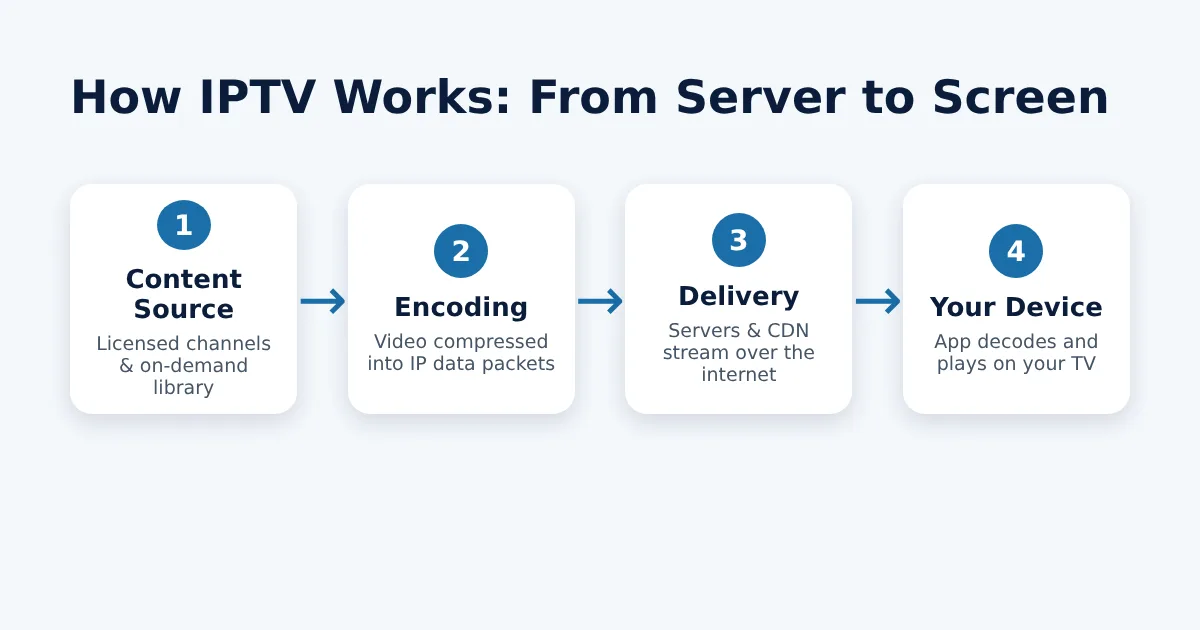
- Content source: The provider licenses live channels, movies and series from broadcasters and studios.
- Encoding: Video is compressed (usually H.264 or H.265/HEVC) and split into IP data packets.
- Delivery: Streams travel from the provider’s servers through a content delivery network (CDN) to your internet connection.
- Playback: An app on your device decodes the stream and plays it, often with a channel guide, search and DVR.
The 3 Types of IPTV
1. Live TV
Real-time channels such as news, sports and entertainment, streamed as they air. This is what most people mean when they search for an IPTV service.
2. Video on Demand (VOD)
A library of movies and episodes you can start any time, like a streaming catalog.
3. Time-Shifted TV
Catch-up, start-over and cloud DVR features that let you rewind or replay shows that have already aired.
IPTV vs. Cable vs. Satellite
| Feature | IPTV / Live TV Streaming | Cable | Satellite |
|---|---|---|---|
| Delivery | Internet connection | Coaxial cable | Satellite dish |
| Contract | Usually month-to-month | Often 1–2 years | Often 2 years |
| Equipment | Devices you already own | Rented cable box | Dish + receiver |
| Watch on the go | Yes, on phones and tablets | Limited | Limited |
| Installation | None – download an app | Technician visit | Technician visit |
| Weather outages | Rare | Rare | Common in storms |

What Do You Need to Watch IPTV?
- Internet speed: Around 10 Mbps for HD and 25 Mbps or more for 4K per stream. Add more if several people stream at once.
- A compatible device: Smart TV (Samsung, LG, Roku TV, Google TV), Amazon Fire TV Stick, Apple TV, iPhone or iPad, Roku, Chromecast, Android box, phone or tablet, or a Windows or Mac computer.
- An app: Each licensed service has its own official app, available from your device’s app store.
- A subscription or free account: Paid services offer cable-style channel packages; free services are supported by ads.
Tip: A wired Ethernet connection or a 5 GHz Wi-Fi band reduces buffering, especially for live sports.
Step-by-step instructions for each screen are in our IPTV setup guides for every device.
Benefits of IPTV
- No long contracts – cancel or pause most services any month.
- Watch anywhere – the same account works on your TV, phone and laptop.
- Cloud DVR – record shows without a box or hard drive.
- Flexible packages – add sports, premium movies or international channels only when you want them.
- Lower total cost – no equipment rental or installation fees.

Drawbacks to Know
- Quality depends on your internet connection.
- Local channels and regional sports vary by ZIP code and service.
- Unlicensed “too good to be true” services carry real risks – see Is IPTV legal? in our FAQ
Popular Examples of Legal IPTV Services
Many well-known streaming platforms are IPTV services. Paid live TV options in the US include YouTube TV, Hulu + Live TV, Sling TV, Fubo, DIRECTV STREAM and Philo. Free, ad-supported options include Pluto TV, Tubi, The Roku Channel, Samsung TV Plus and Xumo Play. We compare them in detail in Best IPTV Service for Live TV and Best IPTV Subscription: Plans and Prices. For a provider-by-provider look at US live TV services, see IPTV Service Providers in the USA.
How to Choose an IPTV Service
- List your must-have channels (local news, a specific sports network, kids’ channels).
- Check your ZIP code on the provider’s website for local and regional sports availability.
- Confirm device support for every TV in your home.
- Compare simultaneous streams and DVR limits.
- Use a free trial when one is offered, and test during a live event.
- Make sure it’s licensed – an official app in major app stores and secure card or PayPal checkout are good signs.
Ready to try IPTV on your own TV? Compare our IPTV subscription plans – plans run 1, 3, 6 or 12 months, setup help for your device is included, and you can request a refund within 3 days of activation (see our refund policy).
Frequently Asked Questions
Is IPTV the same as streaming?
IPTV is a type of streaming. The term usually refers to live TV channels delivered over the internet, while “streaming” also covers on-demand services such as movie libraries.
Do I need a special box for IPTV?
No. Most people use a smart TV or a streaming stick they already own. You simply download the provider’s app – our device setup guides show you how.
Can I watch IPTV without cable?
Yes. IPTV only needs a home internet connection, so it is a popular way to cut the cord.
How much internet speed does IPTV need?
Plan for about 10 Mbps per HD stream and 25 Mbps or more per 4K stream.
How much does an IPTV subscription cost?
Prices vary by provider and plan length. Our plans start at €25 for one month, and the 12-month plan works out to €5.75 per month. See all IPTV subscription plans.
Is IPTV legal?
IPTV technology is legal. What matters is whether the provider has licensed the content it streams. Our IPTV FAQ covers this and other common questions.
The Bottom Line
IPTV is simply TV delivered over the internet – flexible, contract-free and available on almost any screen. Start by choosing the channels you care about, check your internet speed, and pick a licensed provider with a free trial. Ready to compare options? See our ranking of the best IPTV services, or choose an IPTV plan and follow the setup guide for your device.